
Regression Tracking
Debusine is a tool designed for Debian developers and Operating System developers in general. Debusine can run QA pipelines to check that Debian packages are ready to upload. This blog post describes the regression tracking mechanism that’s recently become available in Debusine QA pipelines.
The debian_pipeline workflow in Debusine can build, test, and upload
a package to the Debian archive (or any other repository, such as a
native Debusine APT repository).
The QA tests involve running the standard Debian QA utilities
(lintian, autopkgtest, piuparts, blhc) on the built artifacts.
In addition we can run the autopkgtests of every other package in the
archive that depends on the built package, like britney does for testing
migration in Debian.
Some of these other packages may have currently-failing autopkgtests
that have nothing to do with the changes in the upload under test.
For example:
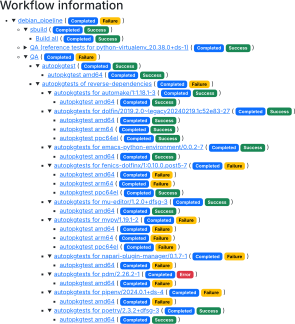
Figuring out which of these failures are new (and thus worth
investigating) has been a manual process in Debusine until now.
We have just completed the basic functionality of the
regression_tracking=true feature, and have enabled it in the
upload-to-* workflows on debusine.debian.net.
With this enabled, you’ll get a new QA tab on your debian_pipeline workflows that shows the trend of each test:
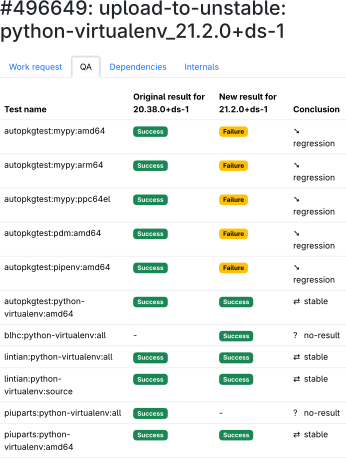
This is determined by looking at recent task history for each task in the debian:qa-results collection. If there is no recent result for a given <package, version, architecture>, then tasks are queued under the “reference tests” qa workflow tree on the pipeline.
These reference tests are run by using the same tasks as the main qa workflow, but without the addition of the package under test. In fact, it uses the same qa workflow that we use to check the package, but with a few different parameters to populate the regression tracking results collection.
The debian:qa-results collection used for analyzing regressions is
specified to the debian_pipeline with the
regression_tracking_qa_results lookup parameter.
On debusine.debian.net we have configured a debian:qa-results
collection for sid that can be referenced and added to by tasks in
any workspace.
Regressions can be more subtle than a simple Success → Failure. If the number of autopkgtests that fail increases, or the number of lintian tags emitted increases, those are also considered a regressions.
Using regression tracking now
It’s enabled by default on most of the upload-to-* workflows on
debusine.debian.net.
To disable, pass -O debusine_workflow_data.enable_regression_tracking=false when you dput
an upload to debusine.
To use the regression-tracking in your own workflows, use a
debian_pipeline workflow that is configured with
enable_regression_tracking=true.
This will require a qa_suite to be specified, pointing to the
baseline suite.
We hope this will make it easier to check QA results for packages tested on debusine.debian.net.